# 전환 설정
{% hint style="info" %}
고객 자사 사이트 유도와 같은 전환을 설정 하는 방법에 대해서 알아봅시다.
{% endhint %}
### 1️⃣ 전환이란?
* 바이럴, 홍보를 위한 마케팅 심리테스트는 체험하는 고객의 유형을 제공하고 자사 사이트, 제품을 구매하는 페이지로 유도하는 행위를 전환 이라고 정의합니다.
* 마케팅 심리테스트의 경우 "외부 URL로 이동" 로직을 이용하여 고객이 사이트, 제품 페이지로 이동할 때마다 자동으로 전환수가 측정 됩니다. (추후 다른 행동도 전환으로 설정할 수 있도록 제공할 예정)
* 전환수는 "대시보드" 페이지에서 확인 가능하며, "프로젝트" 페이지에서도 개별 심리테스트 별로 각각 확인이 가능합니다.
### 2️⃣ 마케팅 심리테스트의 전환 설정 방법
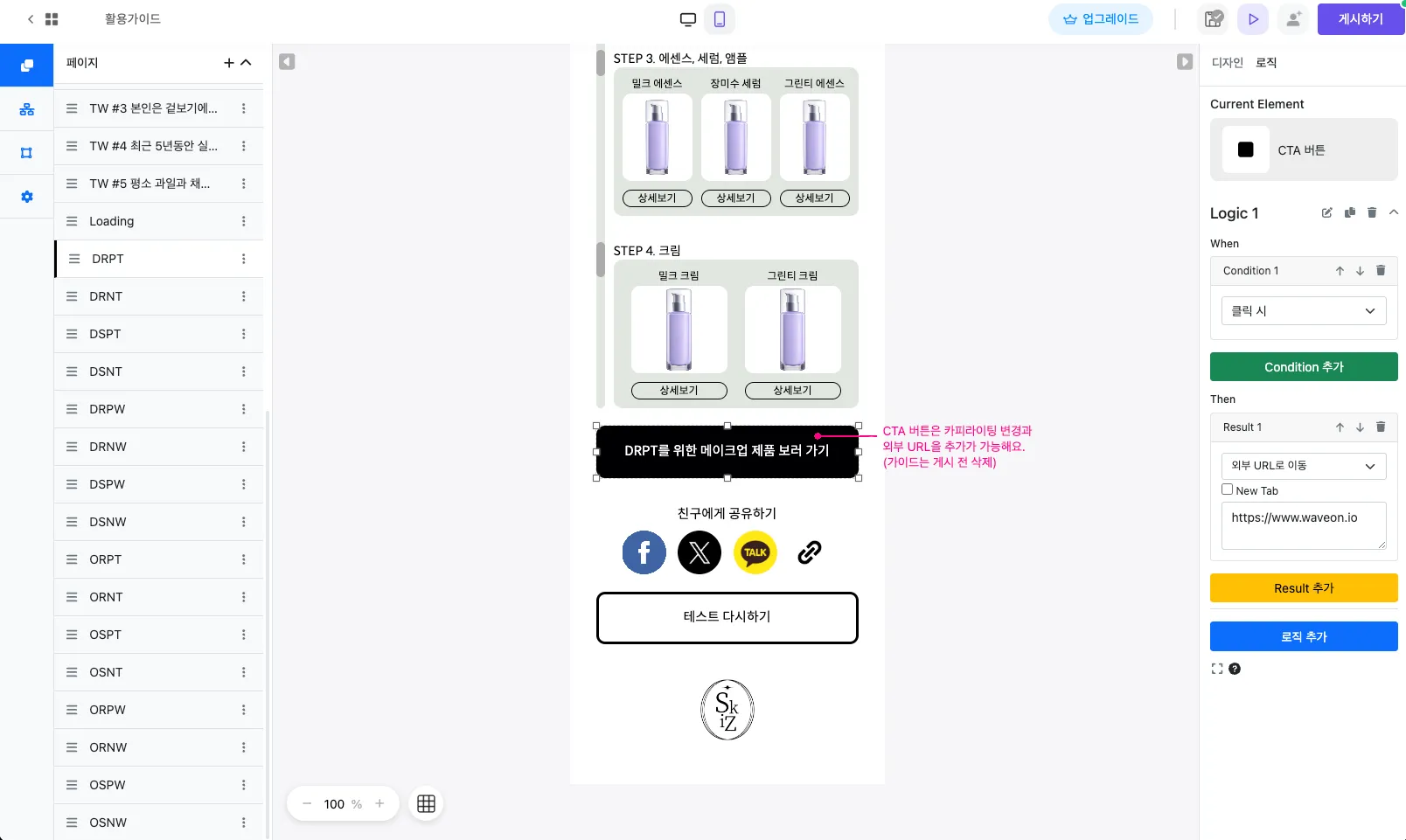
* 심리테스트의 결과 페이지에 "버튼" 을 입력 합니다. 이미 생성되어 있다면 생략해도 좋습니다.
* 생성된 버튼을 클릭하고 우측 "로직" 탭으로 이동합니다.
* 해당 버튼에 아래와 같은 로직을 설정 합니다. 버튼을 클릭할 시 자사 사이트, 제품 페이지로 이동하는 로직을 설정 합니다.
* Condition : "클릭 시"
* Result : "외부 URL 로 이동"
---
# Agent Instructions: Querying This Documentation
If you need additional information that is not directly available in this page, you can query the documentation dynamically by asking a question.
Perform an HTTP GET request on the current page URL with the `ask` query parameter:
```
GET https://docs.waveon.io/quiz-deprecated/set-conversion.md?ask=
```
The question should be specific, self-contained, and written in natural language.
The response will contain a direct answer to the question and relevant excerpts and sources from the documentation.
Use this mechanism when the answer is not explicitly present in the current page, you need clarification or additional context, or you want to retrieve related documentation sections.